
Guide
Zepp Coach Review: Plans, Limits and Intervals.icu Checks
Zepp Coach is the built-in AI trainer on many Amazfit watches. It is useful for simple plans, readiness cues and watch reminders, but it should be checked against real training load when recovery, HR zones or missed workouts look unusual. Intervals.icu and STAS.run add that history.
Quick answer: double-check hard days against load
If Zepp Coach suggests a hard workout but recovery looks poor, compare it with the last 7-14 days of training before you follow it. Intervals.icu shows the load history, and STAS.run lets ChatGPT or Claude explain the recommendation in plain language.
Good for the planned workout, watch reminders and a quick readiness cue.
Look at the last 7-14 days, not only today's score: hard days, missed workouts, sleep, HRV and easy-run heart rate.
Keep the workout, make it easier, or move intensity after you see the bigger picture.
STAS.run uses the Intervals.icu history you connect. You stay in control of plan changes.
What Zepp Coach does
Zepp Coach is more than a timer. It analyzes current fitness, builds a preparation plan toward a goal, and adjusts training load as you complete workouts. Everything runs inside the Zepp app, which makes it convenient for Amazfit users.
Set a goal (5K, 10K, half marathon, marathon), a race date, and your current fitness level — Coach generates a multi-week plan with daily workouts.
Based on sleep data, HRV, and training load, Coach can suggest easier days or rest when recovery looks low.
Each morning it calculates how ready you are for the planned workout. Uses resting HR, HRV, and last night's sleep quality.
Scheduled workouts appear as reminders on the watch face. Tap to start — the watch guides you through each session with pace or HR targets.
How to enable: Open the Zepp app → Workout → Zepp Coach. Enter your goal and race date. Coach creates a plan and syncs the first workouts to your watch.
Zepp Coach support by Amazfit model
Not all Amazfit watches support Zepp Coach equally. Full support means plans, readiness, and recovery recommendations. Partial support means recommendations only — no personalized plans.
Full support
Built for runners. Full Zepp Coach with plans + dual-band GPS.
Lightweight running watch. Full Zepp Coach, round case design.
Trail and ultra running. Full Zepp Coach + workout push from Intervals.icu.
All-around smartwatch. Full Zepp Coach and Intervals.icu workout sync.
Partial support
Recovery recommendations only — no Zepp Coach plans. Best price-to-performance in the lineup.
Basic readiness recommendations. No full plans.
Basic recommendations. Zepp Coach plans not supported.
Not supported
No Zepp Coach. Has Intervals.icu integration out of the box.
No Zepp Coach. Basic running metrics without AI plans.
Where Zepp Coach needs a second check
Zepp Coach is useful for getting started and for simple daily guidance. For bigger goals, mixed training weeks or unclear fatigue, it helps to check the recommendation against a longer training history.
Race preparation usually needs phases: base volume, progressive loading, harder blocks and taper. If the plan feels too flat or too aggressive, review the whole block before following the next workout.
Zepp Coach gives practical guidance, but it does not show the same week-by-week load view as Intervals.icu. That makes it harder to see whether fatigue is building across several weeks.
If sleep was poor, soreness is unusual, or a workout felt much harder than expected, you may need to ask a more specific question than the watch screen can answer.
A generated plan can be a good starting point, but your recent training, missed workouts, other sports and race goal still need context before you increase load.
When to check overtraining risk separately
This is not about blaming Zepp Coach. It is a useful watch-level coach. The point is simple: if a recommendation conflicts with how your body and recent history look, check the load before doing another hard session.
Use it for a simple structure, daily reminders, readiness cues and keeping workouts close to the watch.
Check separately when several hard days stack up, sleep or HRV drops, easy runs feel unusually hard, or other sports add hidden load.
STAS can bring Intervals.icu history into ChatGPT or Claude so you can ask whether the next Zepp workout fits the last few weeks.
| Signal | Why it matters | What to do |
|---|---|---|
| Hard workout recommended after poor recovery | One bad night is not always a problem, but repeated low recovery can make intensity less useful. | Compare the last 7-14 days of load before keeping the hard session. |
| Easy pace suddenly needs higher heart rate | This can point to fatigue, heat, illness, stress or wrong zones. | Review recent easy runs and zone settings before changing the plan. |
| Strength, cycling or hiking is missing from the picture | Extra activity can add fatigue even if the running plan looks normal. | Check total weekly load, not just scheduled Zepp runs. |
| The plan keeps adding load after missed workouts | Compressing work into fewer days can turn a reasonable week into a risky one. | Ask for a lower-load adjustment instead of catching up everything. |
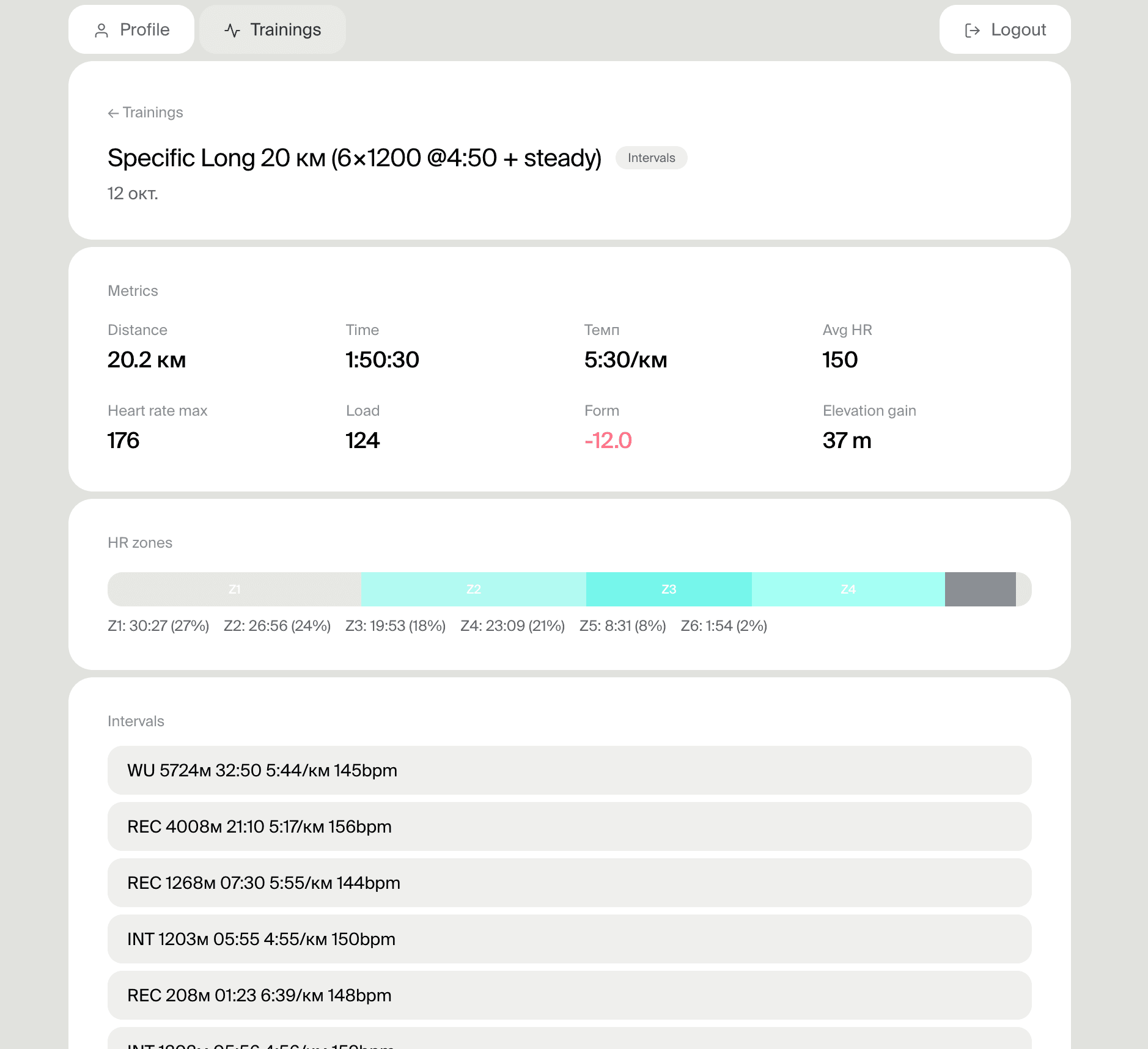
Free setup. You stay in control of any plan changes.
Zepp Coach vs Intervals.icu vs STAS
The practical setup is layered: Zepp keeps the Amazfit watch connected, Intervals.icu gives real training analytics, and STAS.run lets ChatGPT or Claude explain what to do next.
Best for simple built-in guidance on the watch. Weak when you need explanation, long-term analytics, or flexible plan changes.
Best for calendar planning, load tracking, zones, and a complete view of training across weeks.
Best when you want a conversational coach that reads Intervals.icu data and explains plan decisions.
Real analytics: Intervals.icu
Intervals.icu is a free platform for endurance athletes. It doesn't replace Zepp Coach as a plan generator, but it provides what Zepp Coach never will: a complete picture of your training load over time.
Chronic load (fitness), acute load (fatigue), training stress balance (form). You see exactly where you are and whether adding load is safe.
Exactly how much time you spent in each zone — weekly, monthly, yearly. Clear view of whether your training distribution matches your goals.
Your best time for any segment across your entire history. Progress (or lack of it) is immediately visible.
On T-Rex 3 Pro and Balance 2, Intervals.icu pushes structured workouts directly to your watch. Plan in the browser, execute on your wrist.
Free: Intervals.icu is completely free. No trial, no subscription, no feature limits.
How to connect Amazfit to Intervals.icu →The full stack: Amazfit -> Intervals.icu -> STAS.run -> ChatGPT or Claude
For athletes who want the most from their data. Each layer adds what the previous one can't provide.
Amazfit
Collects the data: HR, pace, GPS, sleep, HRV, recovery. Zepp Coach provides basic plans and on-wrist recommendations.
Intervals.icu
Aggregates all workouts, calculates CTL/ATL/TSB, analyzes zones. You see the complete load picture across weeks and months.
STAS
Connects Intervals.icu to ChatGPT or Claude. Passes training history, metrics and current state so the chat works from real data.
ChatGPT or Claude
ChatGPT or Claude can see 26 weeks of history, pace zones, current condition, and your goals. They analyze workouts, help adjust the plan, and answer questions from your real data instead of templates.
Frequently asked questions
Why does Zepp Coach feel too hard?
That can happen when recent weeks already built fatigue, HR zones are off, sleep or HRV dropped, or other activity is not visible in the running plan. Check the full load context before another hard workout.
Should I skip a workout if recovery is poor?
Not always. One poor day does not automatically cancel training, but repeated poor recovery, unusually high HR on easy pace, or unusual fatigue are reasons to reduce load or move intensity.
How do I double-check a Zepp Coach workout?
Compare the recommendation with the last 7-14 days of load, recovery, HR zones, and missed workouts. Intervals.icu shows the history, and STAS helps ask ChatGPT or Claude using that data.
Can I trust Zepp Coach?
Yes, as a useful built-in guide for simple plans and daily recommendations. For a race goal, accumulated fatigue, or a mixed training week, double-check the plan against your history.
Does Intervals.icu replace Zepp Coach?
Not necessarily. Zepp Coach can remain the convenient watch layer. Intervals.icu gives a broader load picture, and STAS lets you discuss that picture in ChatGPT or Claude.
Related guides
Best training apps for Amazfit watches
How to set up Amazfit for serious running training
How to connect Amazfit to Intervals.icu — step-by-step guide
Amazfit training plans — Intervals.icu calendar and watch push
Amazfit interval workouts — structured sessions on your watch
Amazfit heart rate zones — set zones from lactate threshold
Zepp Coach vs Intervals.icu — choose the right layer
Get coaching from ChatGPT and Claude that sees your full training picture
Connect Amazfit to Intervals.icu (free, no limits), then add STAS — ChatGPT and Claude will see CTL/ATL, HR zones, and your full training history.
Connect Intervals.icuFree — Intervals.icu has no subscription